Fixh Assistant: the WhatsApp bot for your lab
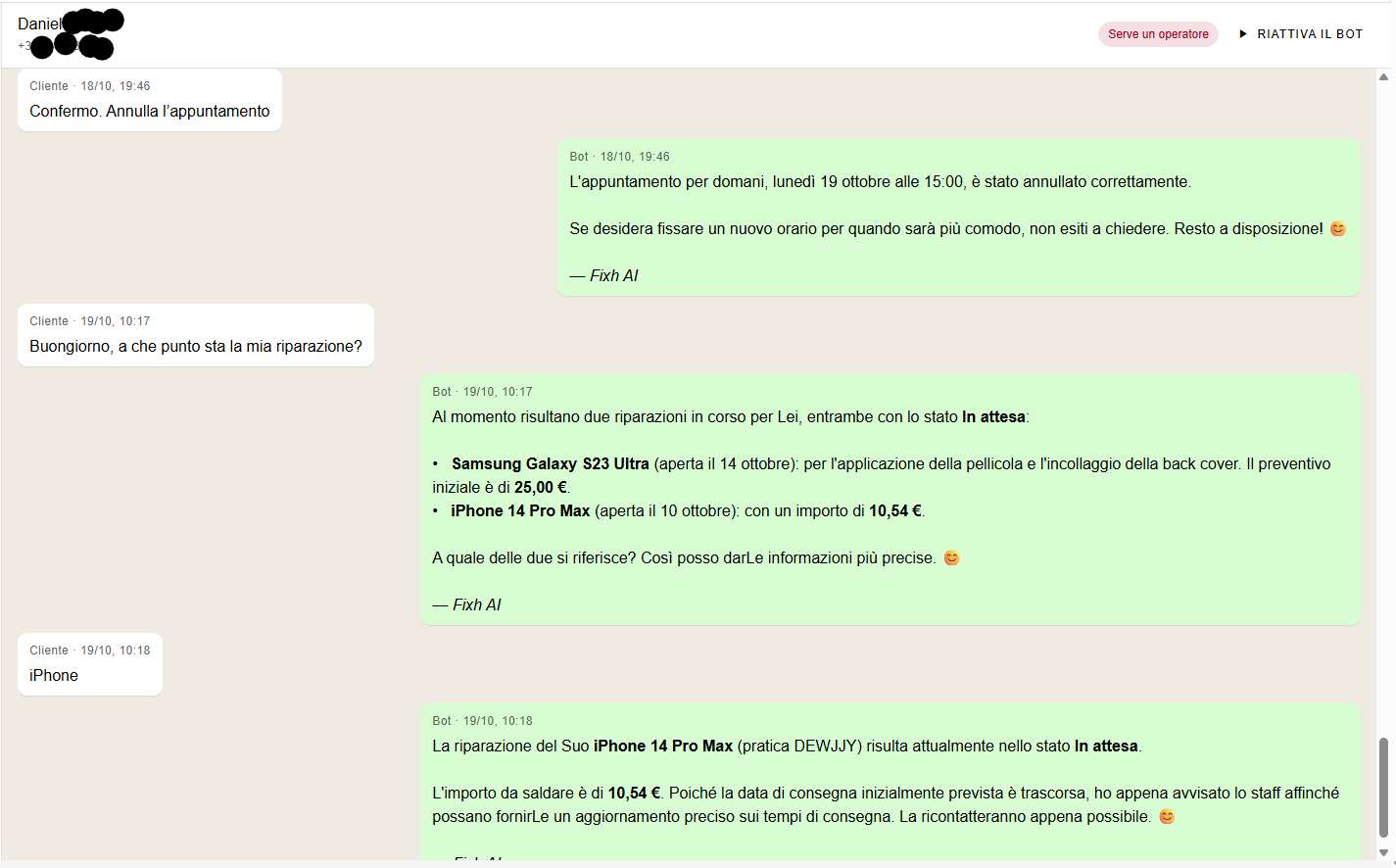
Anyone working in a repair lab knows it well: half the day is spent answering WhatsApp. "Is my phone ready?", "How much does it cost to change an iPhone 13 screen?", "Are you open on Saturday?". Fair questions, but always the same, and they almost always arrive while your hands are deep inside a disassembled smartphone.
Fixh Assistant was born right from this need. It is a Windows app that connects to the shop's WhatsApp and responds to customers using real data from the Fixh management software: repair status, spare part prices in stock, hours, and the appointment calendar. It doesn't make things up. If information is not in the software, it says so and passes the chat to you.
What it can do
Repair status, without opening the software
When a customer writes, the app searches the software for repairs linked to the number the message is coming from. Not to a number the customer types in chat: specifically the one they are writing from. This is a deliberate choice so no one can ask for information about someone else's phone. The customer asks "what's the status?" and receives the updated status without you having to lift your head from the bench.
Quotes with warehouse prices
This is the part technicians like most. If someone asks for a quote, the bot asks the questions you would ask: what model is it, which part needs to be changed, if they want original or compatible parts, OLED or LCD, and if they are in a hurry. Then it responds with prices taken from the repair price list and even tells you if the part is available. If missing, it communicates the arrival time for spare parts that you have set. This questionnaire does not pass through Fixh AI and therefore does not consume credits.
It also works with products for sale: covers, chargers, refurbished phones. The customer asks, the bot checks the POS price list and responds with price and availability.
Calendar appointments
If you enable bookings, Fixh Assistant proposes available times by calculating them from opening hours and appointments already taken. The customer chooses and the appointment goes directly into the management software's calendar. You can decide the duration, how many customers to accept in the same slot, the minimum notice required, and how many days in advance. From version 0.8, the customer can also cancel or reschedule their appointment by writing in the chat.
Warranties
"Is the phone you repaired still under warranty?" This is a question that wastes time because you have to go look for the delivery date and do the math. The app asks the software, which knows the delivered repairs, sold devices, and warranty extensions, with the expiration already calculated. No more guesstimates.
Automatic notifications
You can have the bot write when you open a new repair and when the repair is finished. You write the text only once. The customer receives the message "your device is ready" without anyone having to remember to send it.
Draft or automatic, you decide
At first, many prefer Draft mode: the bot prepares the response and you approve or correct it before it is sent. When you feel confident, you switch to Automatic and responses are sent on their own. In any case, if you reply from your phone or PC, the bot pauses in that chat for the time you've chosen. And if a question is beyond its scope, it passes the conversation to an operator.
After hours, you can decide how it behaves, for example by sending a closing message. You can also exclude certain numbers and choose whether to respond to those who are not yet customers.
Nine languages
The bot recognizes the customer's language and responds in the same one, among the nine available on the platform. The texts you write, such as the closing message or notifications, are translated once and then reused. At the first message, it introduces itself as Fixh AI and signs every response, so the customer always knows who they are talking to.
Multiple PCs on the same number
If you have two or three computers in the shop connected to the same WhatsApp, the customer won't receive three identical replies. The first PC that picks up the message responds; the others flag it and stand by.
How to download and get started
Fixh Assistant is a module of the management software, so first of all, it must be active for your company. You activate it from the License page, choosing how many PCs you want to use it on: each unit of the module corresponds to one computer.
Then, just four steps are needed:
In the management software, open Company > Fixh Assistant and press Download for Windows. Install the app on the shop PC.
Go to the API Keys page and create a key for the app.
Open Fixh Assistant and paste the key. The PC activates and appears in the list of activated PCs in the management software.
Connect WhatsApp by scanning the QR code with the shop phone, just as you would with WhatsApp Web.
From that moment, the app is operational. Before switching to automatic, it is advisable to fill out the settings properly: shop name, useful information, average repair times, opening hours. The more precise they are, the better it responds.
Updates arrive automatically: the app downloads them in the background and only asks you to restart it. If you change computers, from the same page in the software, press Disconnect on the old PC and the slot becomes free again.
One thing to know about costs: the app is included in the license, but every response written by Fixh AI costs a few credits, deducted from the company balance once an hour. The quote questionnaire and notifications are free, and failed responses are not charged. You can see consumption in real-time on the same page under Fixh AI Consumption. If credits run out, the bot stops generating responses and the chat passes to you until you top up.
In a nutshell
Fixh Assistant does not replace the relationship with your customers. It removes repetitive questions—those you answer twenty times a day in the same way—and leaves you with the conversations that really matter. The customer gets an answer immediately, even at ten at night, and you get back to doing what you do best: repairing.
